TIFF Composer1.3.4
Publisher Description
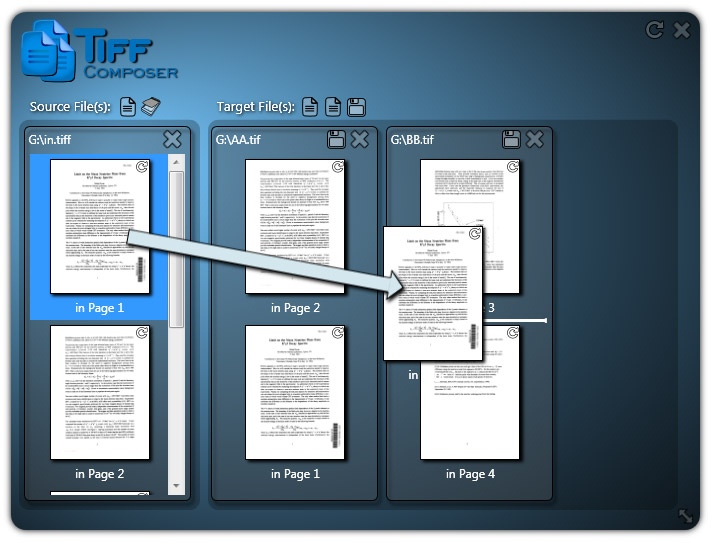
The all in one solution to create, merge, split and arrange multipage TIFF Files.
With TIFF Composer you get the all in one solution to create, merge, split and arrange TIFF Files. The user interface is intuitive and self explanatory. You can immediately begin working even without to read a manual.
Compose your TIFF files simply by drag and drop:
With TIFF Composer you can simply create new TIFF files by drag and drop single pages from existing PDF, TIFF, JPG and other supported files.
Split your multipage TIFF files into single TIFF files. You can also split in batch processes.
Merge as many TIFF files as you want into one TIFF file.
With Extractor you can extract single pages and page ranges from a multipage TIFF file.
With ReArranger you can change the possition of each single page inside your TIFF file. You can also rotate single pages.
With the Converter you are able to convert PDF, JPEG, GIF, BMP, PNG and PSD files into TIFF files. You can also convert TIFF files into JPEG, GIF, BMP and PNG files.
TIFF Composer supports multicore cpu to process your TIFF files as fast as possible to save more time.
About TIFF Composer
This program is available in English, German. It was last updated on 29 September, 2026. TIFF Composer is compatible with the following operating systems: Windows.
The company that develops TIFF Composer is Impressions Future Media. The latest version released by its developer is 1.3.4. This version was rated by 4 users of our site and has an average rating of 3.0.
The download we have available for TIFF Composer has a file size of 5.2 MB. Just click the green Download button above to start the downloading process. The program is listed on our website since 2012-10-31 and was downloaded 353 times. We have already checked if the download link is safe, however for your own protection we recommend that you scan the downloaded software with your antivirus. Your antivirus may detect the TIFF Composer as malware if the download link is broken.
How to install TIFF Composer on your Windows device:
- Click on the Download button on our website. This will start the download from the website of the developer.
- Once the TIFF Composer is downloaded click on it to start the setup process (assuming you are on a desktop computer).
- When the installation is finished you should be able to see and run the program.
Program Details
System requirements
Download information
Pricing
Version History
version 1.3.4
posted on 2012-10-31
Menu 'Settings' added; Language can be changed manually; Filename extensions can be change manually; UI enhancement: Scrollbar redesign; Performance enhancement on PDF to TIFF rendering
version 1.0
posted on 2010-08-16
Initial Version
